For Access to Work claimants and support workers
Access to Work claims that match your award
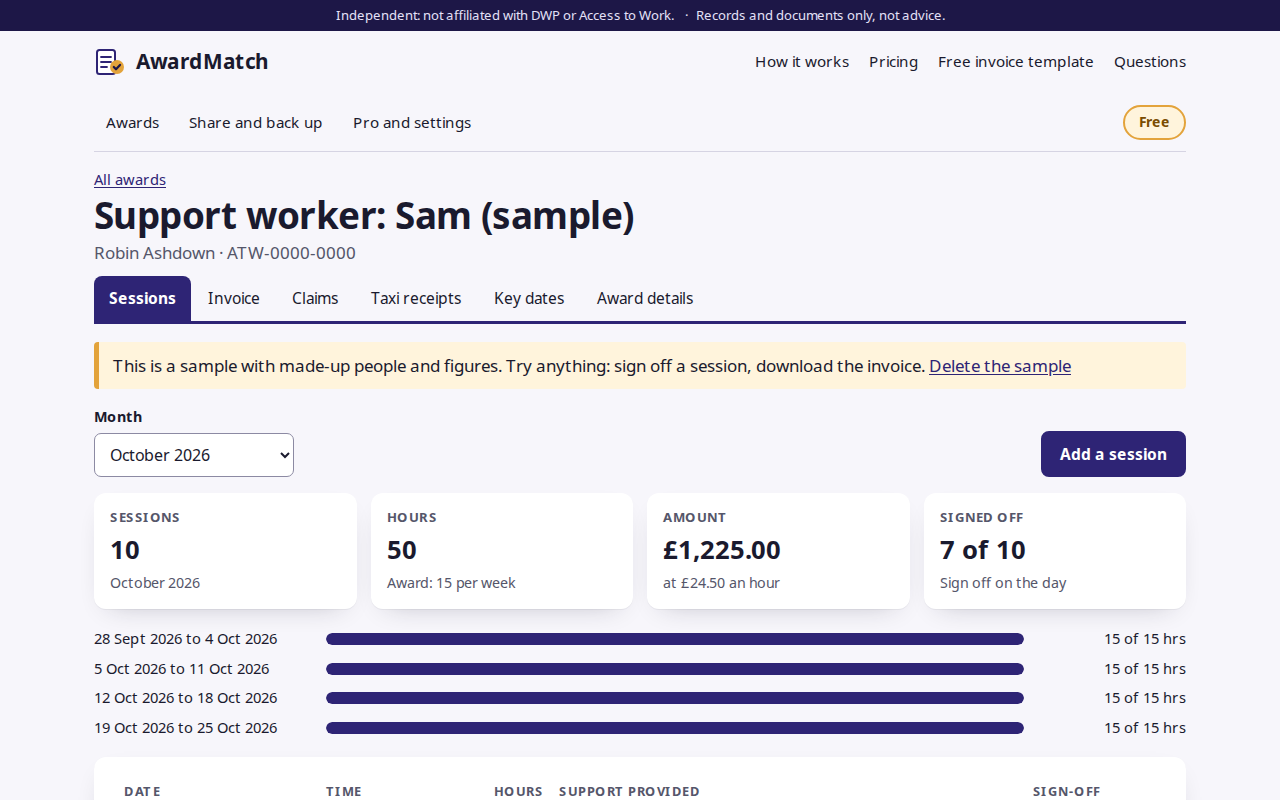
Claims that don’t exactly match the award get sent back. AwardMatch logs each session, gets it signed off on the day, and checks the month against your award’s hours, rate and dates before you claim. Then it makes the invoice.
Free for one award. No account. Your records stay on your device.
How it works
- Add the awardCopy the hours, rate and dates from the decision letter, and the support worker’s invoice details.
- Log sessions as they happenDate, times and what the support was. The person supported signs off on the phone there and then.
- Check the monthOver the weekly hours? Rate doesn’t match? A date outside the award, or a missing UTR? You’ll see it before Access to Work does.
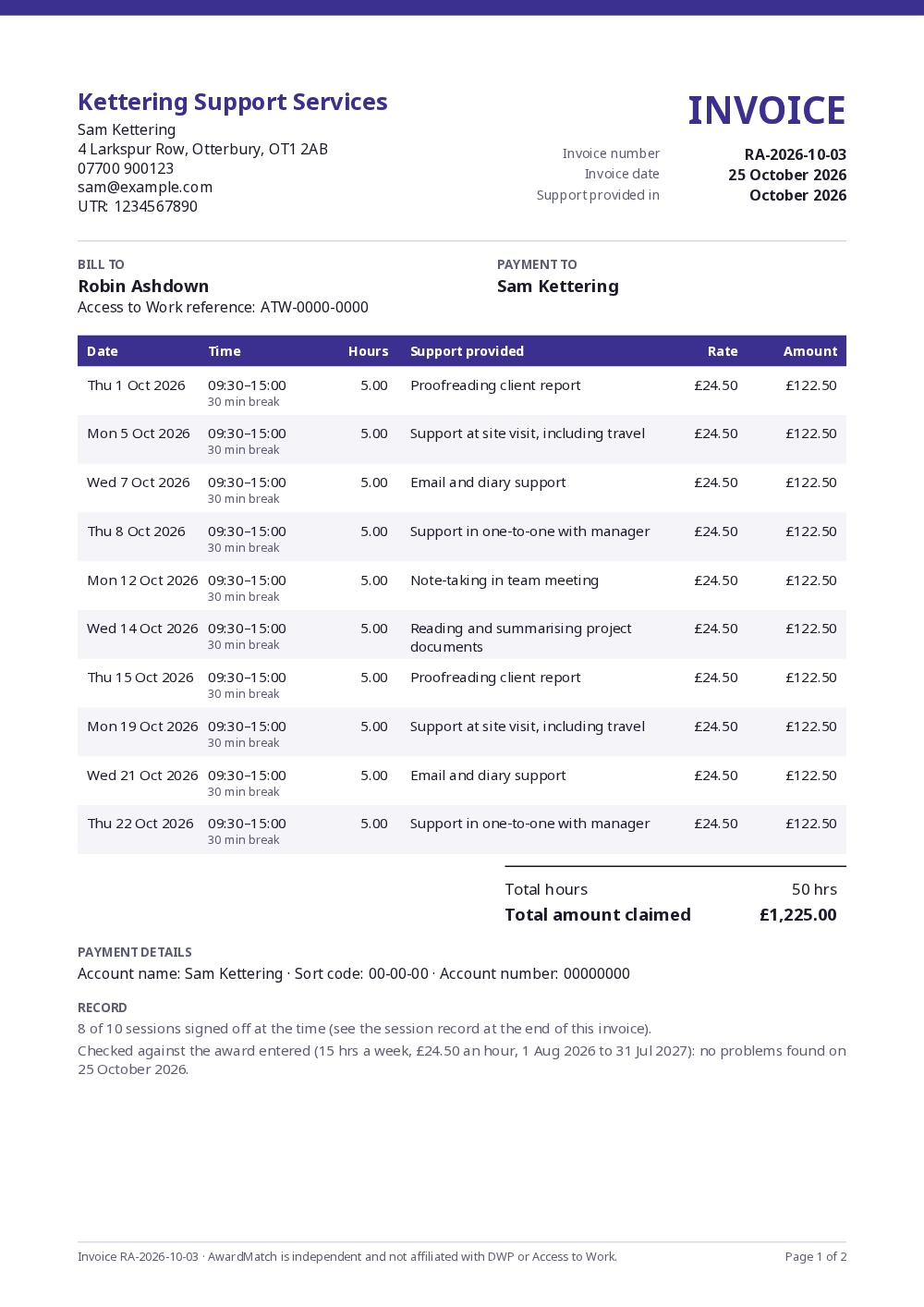
- Download and trackA clean, itemised invoice PDF with the session record. Mark it submitted, then paid, and see how long payment took.
Checked against the award
Hours per week, month or year, the hourly rate, award dates, the nine-month limit, overlapping or duplicate sessions, and the worker details invoices need.
Sign-off on the day
Draw a signature with a finger, or type a name. Each sign-off is timed and goes into a session record at the end of the invoice.
Claim tracker
Ready, submitted, paid or returned, with the days each payment took. Returned claims free their sessions to fix and resend.
Reminders
Before a month’s sessions pass the nine-month limit, when renewal opens (12 weeks before the award ends), and when it ends. Add them all to your calendar.
Taxi receipts
A checklist for each receipt: company, addresses with postcodes, date, time, cost and driver details for app-booked rides.
Share securely
Send an encrypted copy between the support worker and the person they support. Opening it merges new sessions and sign-offs.
Private by design
Everything is stored in your browser. No account, no upload, and no field for anyone’s health or disability.
Works for everyone
Built to WCAG 2.2 AA, plain English, works offline once opened, and installs on your phone like an app.
An invoice Access to Work can follow
Every session itemised with its date, times, hours, a description of the support, rate and amount. The worker’s full name, UTR and contact details at the top, bank details at the bottom, and a session record of who signed off what, and when.
Only need one invoice? Try the free Access to Work invoice template. No account, nothing saved.
Pricing
Free
For claimants, and for workers with one client.
- One award
- Session log with sign-off
- Invoices checked against the award
- Claim tracker and reminders
- Taxi receipt checklist
- Encrypted sharing and backups
£5 a month, or £45 a year
Worker Pro, for support workers and interpreters with several clients.
- Everything in Free
- Unlimited clients and awards
- Your name, colour and logo on invoices
- Payment ageing across all clients
- Cancel any time, 14-day refund
Questions
Is AwardMatch part of Access to Work or DWP?
No. AwardMatch is independent and not affiliated with DWP or Access to Work. It’s a record-keeping tool made by Onibaku, a small UK software maker. You still submit claims yourself, through the Access to Work claim service on GOV.UK or by post.
Does it give advice about my award?
No. It compares your records with the award details you type in (hours, rate and dates) and points out mismatches, like a careful second pair of eyes. Access to Work decides what it pays. For questions about your award, call the Access to Work helpline on 0800 121 7479.
Where are my records kept?
In your browser, on your device. Nothing about your award, sessions or claims is sent to us, and there’s no account to make. Our licence server only sees a licence key and a random ID for your browser, and our page counter sees which pages are visited, never what you type.
Does it ask about my disability or health?
No, never. There’s no field for it, and the session descriptions are about the work (“note-taking in team meeting”), not about you. Access to Work already has what it needs from your application.
Why sign off each session?
It’s your own evidence. When the person receiving support signs off a session on the day (drawn with a finger, or by typing their name), you both have a timed record that the support happened as logged. If a claim is ever queried, the session record at the end of the invoice shows who signed what, and when. It isn’t something Access to Work requires.
Can a support worker and the person they support both use it?
Yes. One of you keeps the log, then sends the other an encrypted copy (a small file with a passphrase). Opening it merges new sessions, sign-offs and claims into the other person’s copy, so nothing is lost.
What if I lose my phone or clear my browser?
Then the records in that browser are gone, which is why the app reminds you to download a backup after you make changes. A backup is one small file you can keep anywhere and open again later.
How much is it?
Free for one award, with every claim feature: session log, sign-off, checked invoices, the claim tracker, taxi receipts and reminders. Worker Pro is £5 a month or £45 a year, for support workers with several clients: unlimited awards, your own branding on invoices and payment ageing across clients.
Can I get a refund?
Yes. Email admin@onibaku.co.uk within 14 days of paying and we’ll refund you. You can cancel Worker Pro any time from the billing link in the app.
Is it accessible?
We build to WCAG 2.2 AA: everything works with a keyboard and screen readers, focus is always visible, there’s no time limit, and signing can be done by typing a name. Automated accessibility tests run on every change. Read the accessibility statement.